<?xml version="1.0" encoding="utf-8"?><feed xmlns="http://www.w3.org/2005/Atom" ><generator uri="https://jekyllrb.com/" version="3.10.0">Jekyll</generator><link href="https://cperry26.github.io/feed.xml" rel="self" type="application/atom+xml" /><link href="https://cperry26.github.io/" rel="alternate" type="text/html" /><updated>2026-04-19T22:41:07+00:00</updated><id>https://cperry26.github.io/feed.xml</id><title type="html">Rand() Thought</title><subtitle>The random ramblings of a passionate and curious software developer. I write about whatever floats my boat, but will lean towards programming and technology. All views are my own and do not reflect the opinions of any company I have worked for or am currently working for.</subtitle><entry><title type="html">whoami</title><link href="https://cperry26.github.io/background/2026/04/19/about-me.html" rel="alternate" type="text/html" title="whoami" /><published>2026-04-19T08:00:00+00:00</published><updated>2026-04-19T08:00:00+00:00</updated><id>https://cperry26.github.io/background/2026/04/19/about-me</id><content type="html" xml:base="https://cperry26.github.io/background/2026/04/19/about-me.html"><![CDATA[<p>I have published a couple of blog posts up to now that come from work, and I wanted to expand a bit more on my about <a href="https://cperry26.github.io/about">page</a>.</p>

<h1 id="whoami">whoami</h1>
<p>My name, of course, is Cody and welcome to Rand() Thought. I know, a great bit of programming humor for a blog name (and post title), please hold your laughs. By day, I’m a software engineer who works on web applications. By night, I spend my time with too many hobbies and not enough free time. Namely: reading, video games, sports, and what I call curiosity. Fortunately or unfortunately (I will let you decide), I cannot help myself and have an insatiable need to keep learning. That leads me down numerous rabbit holes I somehow manage to get myself out of.</p>

<p>As I have gotten older, I have found my personal interests skewing more towards the lower level languages and problems. Think C++ and game development, computer graphics, servers, and more. To be honest though, I have always found this layer intimidating. I would look at idiomatic C++ code, or listen to proficient developers and feel a plethora of imposter syndrome. While that feeling exists for everyone, I have always felt better at and more comfortable in higher level languages like Java/TypeScript/JavaScript/Ruby.</p>

<h2 id="purpose">Purpose</h2>
<p>I will not be able to tell you whether or not this blog will be a worthwhile read or follow. My goal is for it to be a place for me to express my thoughts on topics I find personally interesting, as well as to explore stepping out of my comfort zone. As I stated above, my interests are changing, and I think it would be valuable to document my journey in fighting my imposter syndrome, and growing as an engineer.</p>

<h2 id="direction">Direction</h2>
<p>I believe a chunk of the early content here will be about a few main topics. First, my foray into open source. I have always wanted to become an open source contributor. It is not only such a pivotal part of how we build software, but it is also an opportunity to improve skills, make connections, and pay back the community. Similar to what I outlined above, my fear or anxiety has been a major blocker for me doing so, as I have been fighting that feeling of “not being good enough”.</p>

<p>Second, I have begun relearning C++. I want to overcome that trepidation of lower level software, and challenge myself to grow as an egineer. This will expose me to tons of new problems, and give me a better foundation for my other interests.</p>

<p>Lastly, exploring those other interests mentioned above. For example, I recently built a small 2D side scrolling game called <a href="https://github.com/CPerry26/dap-dash">Dap Dash</a> using <a href="https://www.raylib.com/">Raylib</a>. I would not call the project impressive, or the nicest C++ code, but I learned a lot and had a blast making it. I think there will be more in the same vein here.</p>

<h2 id="closing">Closing</h2>
<p>This blog will naturally change over time as I do. I hope it is a place where I can collect my thoughts, go on some rants, and be honest in my journey to become a better and more well rounded engineer. Along the way, I hope to make genuine connections, and find the joy in my personal interests. If that sounds interesting, I would be happy to connect. If not, do not worry, I promise not to take it personal!</p>

<h1 id="connect">Connect</h1>
<p>You can find me on <a href="https://github.com/CPerry26">GitHub</a>, <a href="https://linkedin.com/codysperry/">LinkedIn</a>, and <a href="https://techhub.social/@codyp">Mastadon</a>. I also use Discord, but you are only getting that if you are special!</p>]]></content><author><name>Cody Perry</name></author><category term="background" /><category term="about-me," /><category term="background" /><summary type="html"><![CDATA[I have published a couple of blog posts up to now that come from work, and I wanted to expand a bit more on my about page.]]></summary></entry><entry><title type="html">Why Our Node 22 Upgrade Kept Killing Our Pods</title><link href="https://cperry26.github.io/programming/2026/04/09/why-our-node-22-upgrade-kept-killing-our-pods.html" rel="alternate" type="text/html" title="Why Our Node 22 Upgrade Kept Killing Our Pods" /><published>2026-04-09T00:02:22+00:00</published><updated>2026-04-09T00:02:22+00:00</updated><id>https://cperry26.github.io/programming/2026/04/09/why-our-node-22-upgrade-kept-killing-our-pods</id><content type="html" xml:base="https://cperry26.github.io/programming/2026/04/09/why-our-node-22-upgrade-kept-killing-our-pods.html"><![CDATA[<p>As an engineer on one of Meltwater’s enablement teams, I work on managing our user authentication and permissions, and making that data available to other engineering teams.</p>

<p>In this blog post, we will be exploring our recent experience hunting down a memory leak after bumping from Node.js 18 to 22. This post will not explain how the heap works, nor the finer details of debugging like retainer chains. There are far more expansive articles out there on those topics. Instead, we will focus on our upgrade process, root cause discovery, fixes implemented, and lessons learned.</p>

<h2 id="tldr">TL;DR</h2>

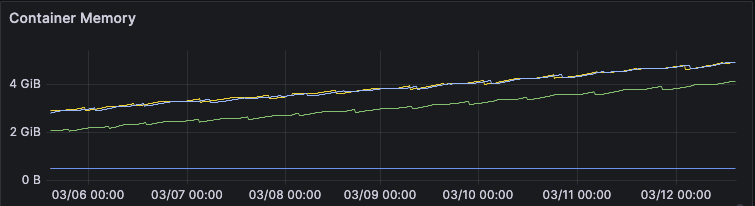
<p>We have a Kubernetes hosted Node.js service that we bumped from 18 to 22. We observed pod restarts every 6-8 hours from exceeding the container resource limits. The memory metrics were growing consistently and never dipping. Here’s a representative screenshot of the growth behavior:</p>

<figure style="margin: 2em 0;">
<img src="/images/2026-04-08-why-our-node-22-upgrade-kept-killing-our-pods/memory-growth-over-time.png" alt="Grafana dashboard showing container memory steadily increasing from 2 GiB to over 4 GiB over several days" title="Container memory growth over time" />
<figcaption>Container memory growing steadily over time without any dips, indicating a memory leak</figcaption>
</figure>

<p>The memory issues were caused by a number of issues, the main ones being:</p>

<ul>
  <li>Dependency object and closure retention</li>
  <li>Insufficient caching logic</li>
  <li>Cascading effects of underlying V8 engine changes</li>
</ul>

<p>The rest of this article will go in-depth into the many fixes implemented to address the above, as well as the lessons learned from the overall experience. The key takeaway is to monitor and alert on the core Node performance metrics, especially after runtime upgrade.</p>

<h2 id="background">Background</h2>

<p>The service we will be discussing today manages user’s permissions across the application, and is deployed to Kubernetes. The volume of the permissions service is around ~23 req/s.</p>

<p>As a team, we try our best to keep up with Node’s LTS <a href="https://nodejs.org/en/about/previous-releases" target="_blank">version releases</a>. When we have end of life (EOL) versions, especially those going unsupported in AWS, we try to sync the versions across all of our services at once. The upgrade process is simple:</p>

<ul>
  <li>Update the <a href="https://github.com/nvm-sh/nvm" target="_blank">NVM</a> version</li>
  <li>Run <code class="language-plaintext highlighter-rouge">npm install</code></li>
  <li>Rerun all automated tests to ensure no regressions</li>
  <li>Ship to our staging environment</li>
  <li>If there are no issues, namely functional regressions, ship to production</li>
</ul>

<p>We followed that same process for our permissions service. There were no alerts and no functional regressions. What we did not realize at the time was that we had already seen a warning sign. We had previously attempted to upgrade an authentication service to Node.js 20. After upgrading the authentication service, we began to have memory issues causing the Node process to die from failed heap allocations. We made some patches to the authentication service, but ultimately were unable to address those memory issues. Looking back, that should have been the first red flag to us, as it reuses similar code via dependencies and many of the same patterns.</p>

<h2 id="investigation">Investigation</h2>

<p>Although there were no functional regressions, in the background, we had silent failures and regressions we were unaware of: pod restarts.</p>

<h3 id="warning-signs">Warning Signs</h3>

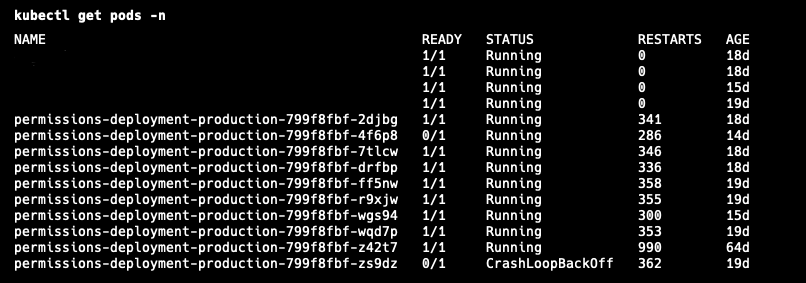
<p>Once we noticed the pods kept restarting, it was trivial to extract the reason. The scary picture was how often it was restarting:</p>

<figure style="margin: 2em 0;">
<img src="/images/2026-04-08-why-our-node-22-upgrade-kept-killing-our-pods/pod-restarts-kubectl.png" alt="kubectl get pods output showing permissions deployment pods with hundreds of restarts and one in CrashLoopBackOff" title="Pod restart counts" />
<figcaption>kubectl output showing pods with over 300 restarts each, and one pod in CrashLoopBackOff</figcaption>
</figure>

<div class="language-bash highlighter-rouge"><div class="highlight"><pre class="highlight"><code>kubectl describe pod POD_NAME <span class="nt">-n</span> NAMESPACE
</code></pre></div></div>

<p>Running the above gives the reason for the restart. In our case, it was the dreaded OOMKilled error. Here is some sample output of the OOMKilled error:</p>

<div class="language-yaml highlighter-rouge"><div class="highlight"><pre class="highlight"><code><span class="na">Containers</span><span class="pi">:</span>
  <span class="na">my-app-container</span><span class="pi">:</span>
    <span class="na">Container ID</span><span class="pi">:</span> <span class="s">docker://3f1c2e8b9a7c6d5e4f1234567890abcdef...</span>
    <span class="na">Image</span><span class="pi">:</span> <span class="s">my-app:latest</span>
    <span class="na">Port</span><span class="pi">:</span> <span class="s">8080/TCP</span>
    <span class="na">Host Port</span><span class="pi">:</span> <span class="s">0/TCP</span>
    <span class="na">State</span><span class="pi">:</span> <span class="s">Running</span>
    <span class="na">Last State</span><span class="pi">:</span> <span class="s">Terminated</span>
      <span class="s">Reason</span><span class="err">:</span> <span class="s">OOMKilled</span>
      <span class="s">Exit Code</span><span class="err">:</span> <span class="m">137</span>
    <span class="na">Ready</span><span class="pi">:</span> <span class="s">True</span>
    <span class="na">Restart Count</span><span class="pi">:</span> <span class="m">3</span>
</code></pre></div></div>

<p>Just because your pod gets an OOMKilled error does not necessarily mean you have a memory leak however. We had been doing active feature development work in this service, including introducing caching logic.</p>

<h3 id="first-steps">First Steps</h3>

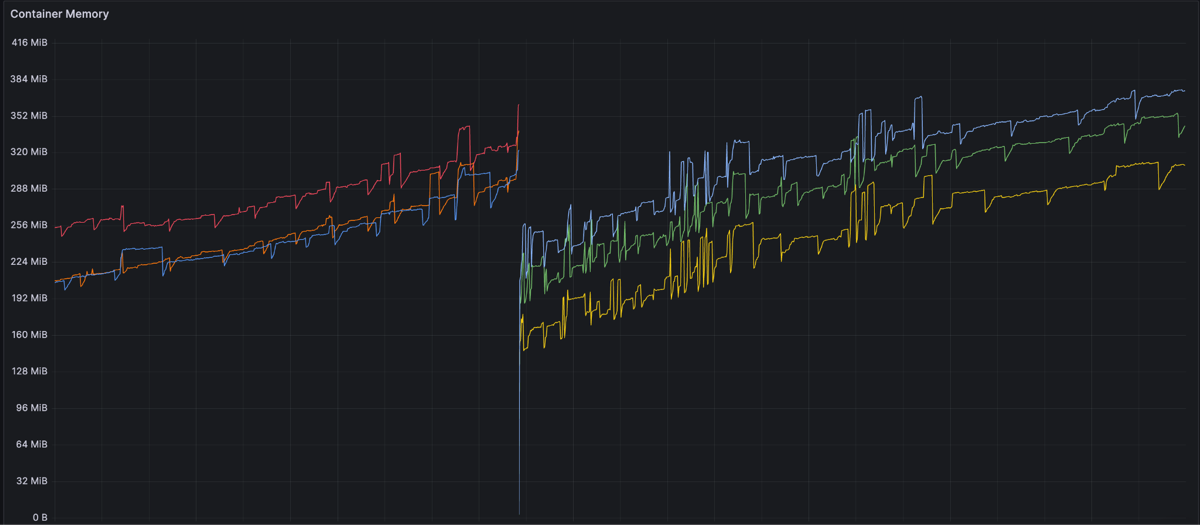
<p>It was possible that this feature work increased the memory footprint naturally to exceed the defined resource limits. Our first step was to increase the pod limits and monitor, but they kept running out of memory. Here is another snapshot of the OOM behavior with a restart in between:</p>

<figure style="margin: 2em 0;">
<img src="/images/2026-04-08-why-our-node-22-upgrade-kept-killing-our-pods/oom-behavior-with-restart.png" alt="Grafana dashboard showing container memory climbing from around 200 MiB to over 350 MiB with periodic drops from pod restarts" title="OOM behavior with pod restarts" />
<figcaption>Memory climbing steadily across pods, with visible drops from OOM-triggered restarts</figcaption>
</figure>

<p>Having never investigated an out of memory issue in Node before, we started with some simple tasks:</p>

<ul>
  <li>Cleaning up problematic logic we found in the authentication service duplicated in the permissions service</li>
  <li>Bump all dependencies in case of incompatibility</li>
  <li>Upgrade past Node 22</li>
  <li>Downgrade to Node 18</li>
</ul>

<p>After each of these changes, we monitored the memory, but it kept increasing over time after deployment (yes, even when we downgraded back to Node 18).</p>

<p>This led us down two paths: what changed in Node and when did this start? The former was harder to discover but the latter was easy. The memory issue started after we upgraded the service to Node 22, and an internal dependency (which also bumped it to Node 22). This explained why the downgrade to Node 18 failed, and it was not possible for us to downgrade both the library and service (due to underlying AWS requirements). We validated our assumptions about Node against two other services, one on Node 18 and one on 22. The service with 18 had no memory issues, and the other Node 22 service had the same problem as permissions.</p>

<figure style="margin: 2em 0;">
<img src="/images/2026-04-08-why-our-node-22-upgrade-kept-killing-our-pods/memory-growth-over-time.png" alt="Grafana dashboard showing container memory steadily increasing from 2 GiB to over 4 GiB over several days" title="Consistent memory growth pattern" />
<figcaption>The same consistent memory growth pattern observed across affected services</figcaption>
</figure>

<p>For the changes in Node 20 and 22 specifically, we spent time researching GitHub issues and changelogs. Ultimately, we discovered that two main changes occurred after Node 18. First, heap sizes were now computed differently inside of V8, resulting in lower spaces depending on your configured settings (including the defaults). Second, the way async closure retention was handled was updated in V8 to improve performance but could cause retention if you do not explicitly clean up resources (previously those closures would auto resolve and get cleaned up by GC).</p>

<p>This was definitely <strong>not</strong> a memory leak in the runtime, but the two threads identified underlying changes that had effects on our performance and we did not know why.</p>

<h2 id="root-cause-discovery">Root Cause Discovery</h2>

<p>Now that we knew we had a problem, we had to first learn how to debug a Node process effectively.</p>

<h3 id="learning">Learning</h3>

<p>All of our services run within Docker, so we added the following two changes:</p>

<div class="language-dockerfile highlighter-rouge"><div class="highlight"><pre class="highlight"><code><span class="k">EXPOSE</span><span class="s"> 9229</span>
</code></pre></div></div>

<div class="language-bash highlighter-rouge"><div class="highlight"><pre class="highlight"><code>node <span class="nt">--inspect</span><span class="o">=</span>0.0.0.0 server.js
</code></pre></div></div>

<p>The first exposes the websocket debug port on the container, the second enables the Node inspector on the process using port 9229. Please note, it is <strong>not</strong> recommended to use <code class="language-plaintext highlighter-rouge">0.0.0.0</code>. This allows traffic from <strong>any</strong> location. We accepted this risk as we were running locally. Do not do this in production.</p>

<p>Once the inspector is running, you can connect to your Node process using Chrome’s DevTools by going to <code class="language-plaintext highlighter-rouge">chrome://inspect</code> and then selecting your process. This allows you to start observing performance and memory.</p>

<p>In parallel to trying out the different memory options, we implemented a memory logger to see what specifically was growing. On a 5 minute interval, we would log from the process and examine what was growing.</p>

<div class="language-javascript highlighter-rouge"><div class="highlight"><pre class="highlight"><code><span class="nx">process</span><span class="p">.</span><span class="nx">memoryUsage</span><span class="p">()</span>
</code></pre></div></div>

<p>The first thing we discovered was growing array buffers.</p>

<p>We then spent time gaining understanding of the different views in DevTools and how to interpret them.</p>

<figure style="margin: 2em 0;">
<img src="/images/2026-04-08-why-our-node-22-upgrade-kept-killing-our-pods/devtools-heap-snapshot-comparison.png" alt="Chrome DevTools summary comparison view showing over 2 megabytes of string allocations between two heap snapshots" title="DevTools heap snapshot comparison" />
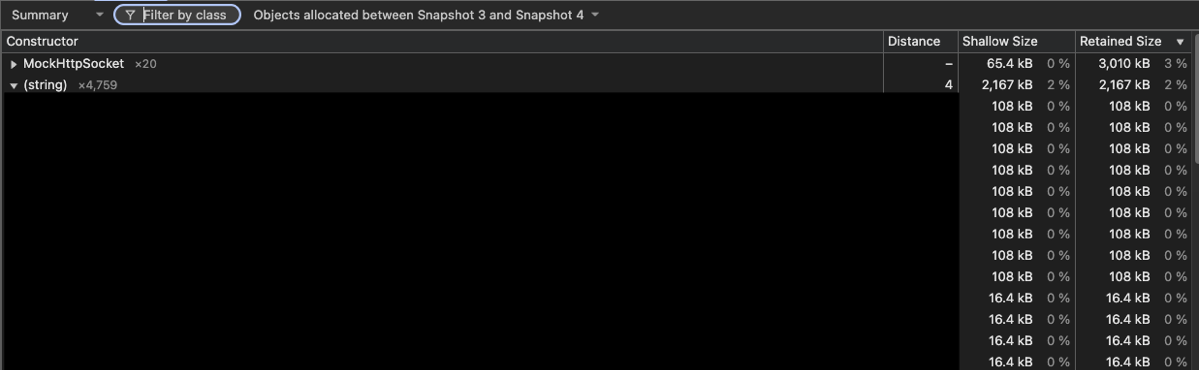
<figcaption>The DevTools summary comparison view showing over 2 MB of string allocations between two snapshots taken 10 minutes apart</figcaption>
</figure>

<p>For example, in the summary comparison view, you can run a difference against two heap snapshots. Here you can see that between two snapshots around 10 minutes apart, we allocated over 2 megabytes of strings, many of which were unexpectedly duplicated.</p>

<p>Once that investigative foundation was there, we could continue digging into what was different over time between snapshots.</p>

<h3 id="steps-forward-and-back">Steps Forward and Back</h3>

<h4 id="duplicate-strings">Duplicate Strings</h4>

<p>Our first observation was an ever increasing amount of strings being created that were never cleaned up (over 1MB every 10 minutes). The key insight was these strings were highly duplicated, which is unexpected. Effectively we were caching authorization information every minute or so in the background. It would be expected that information would be cleaned up after refresh, but was not because the requests and responses themselves were being retained. To fix this, we cleaned up the fetch logic and caching in our library and bumped the version of the dependency in the permissions service.</p>

<h4 id="duplicate-requests">Duplicate Requests</h4>

<p>We used a library called <a href="https://github.com/forwardemail/superagent" target="_blank">superagent</a> for making requests to other APIs. We had been using it for a long time without problems. When running the service with no traffic, we saw an ever increasing number of request objects that were never cleared. To address this, we rewrote this logic with Node’s native <a href="https://developer.mozilla.org/en-US/docs/Web/API/Fetch_API" target="_blank">fetch</a>, and also ensured that closures were handled and closed properly. The previous logic led to closures being retained similar to the duplicate strings. Because they never truly resolved, the garbage collector never deallocated them.</p>

<h4 id="code-cleanup">Code Cleanup</h4>

<p>Outside of the above, there were two other problems. First, there were <a href="https://en.wikipedia.org/wiki/Singleton_pattern" target="_blank">singletons</a> that were not actually singletons. Second, insufficient cache cleanup logic.</p>

<p>The problematic singleton was the AWS S3 SDK. We ended up creating multiple of these unexpectedly, which all held their own connections, array buffers, and more resources that were never garbage collected. We enforced a true singleton by creating the client in the constructor, and only exposing instances through a build function which reused an instance:</p>

<div class="language-javascript highlighter-rouge"><div class="highlight"><pre class="highlight"><code><span class="kd">constructor</span><span class="p">()</span> <span class="p">{</span>
  <span class="nx">_s3Client</span> <span class="o">=</span> <span class="k">new</span> <span class="nx">S3Client</span><span class="p">({</span>
    <span class="na">region</span><span class="p">:</span> <span class="nx">configuration</span><span class="p">.</span><span class="kd">get</span><span class="p">(</span><span class="dl">'</span><span class="s1">AWS_DEFAULT_REGION</span><span class="dl">'</span><span class="p">),</span>
    <span class="na">accessKeyId</span><span class="p">:</span> <span class="nx">configuration</span><span class="p">.</span><span class="kd">get</span><span class="p">(</span><span class="dl">'</span><span class="s1">AWS_ACCESS_KEY_ID</span><span class="dl">'</span><span class="p">),</span>
    <span class="na">secretAccessKey</span><span class="p">:</span> <span class="nx">configuration</span><span class="p">.</span><span class="kd">get</span><span class="p">(</span><span class="dl">'</span><span class="s1">AWS_SECRET_ACCESS_KEY</span><span class="dl">'</span><span class="p">)</span>
  <span class="p">});</span>
<span class="p">}</span>

<span class="kd">static</span> <span class="nx">build</span><span class="p">()</span> <span class="p">{</span>
  <span class="k">if</span> <span class="p">(</span><span class="o">!</span><span class="nx">_instance</span><span class="p">)</span> <span class="p">{</span>
    <span class="nx">_instance</span> <span class="o">=</span> <span class="k">new</span> <span class="nx">S3ClientWrapper</span><span class="p">();</span>
  <span class="p">}</span>
  <span class="k">return</span> <span class="nx">_instance</span><span class="p">;</span>
<span class="p">}</span>
</code></pre></div></div>

<p>And here is a sample of how we introduced an interval to run a cache eviction function for an in-memory cache, addressing the second issue:</p>

<div class="language-javascript highlighter-rouge"><div class="highlight"><pre class="highlight"><code><span class="nx">_startCacheEviction</span><span class="p">()</span> <span class="p">{</span>
  <span class="nx">_cacheEvictIntervalId</span> <span class="o">=</span> <span class="nx">setInterval</span><span class="p">(()</span> <span class="o">=&gt;</span> <span class="p">{</span>
    <span class="kd">const</span> <span class="nx">removed</span> <span class="o">=</span> <span class="nx">cache</span><span class="p">.</span><span class="nx">evictExpiredEntries</span><span class="p">();</span>
    <span class="k">if</span> <span class="p">(</span><span class="nx">removed</span> <span class="o">&gt;</span> <span class="mi">0</span><span class="p">)</span> <span class="p">{</span>
      <span class="nx">logger</span><span class="p">.</span><span class="nx">info</span><span class="p">(</span><span class="dl">'</span><span class="s1">CACHE_EVICT</span><span class="dl">'</span><span class="p">,</span> <span class="p">{</span>
        <span class="nx">removed</span><span class="p">,</span>
        <span class="na">entries</span><span class="p">:</span> <span class="nx">cache</span><span class="p">.</span><span class="nx">size</span><span class="p">()</span>
      <span class="p">});</span>
    <span class="p">}</span>
  <span class="p">},</span> <span class="mi">300000</span><span class="p">);</span>

  <span class="nx">_cacheEvictIntervalId</span><span class="p">.</span><span class="nx">unref</span><span class="p">();</span>
<span class="p">}</span>
</code></pre></div></div>

<h2 id="fixes">Fixes</h2>

<p>As you can see so far, unfortunately, there was no silver bullet here. We had found many issues, and made a multitude of fixes. Those fixes did improve the memory growth to be at a much smaller rate. We prematurely got excited: we fixed the issue!</p>

<p>The observant of you will notice all of this was done <em>locally</em>. There was no real volume to the service. While we fixed issues, they were only <em>part</em> of the overall problem. In order to find the other culprits, we needed to replicate the behavior of a real environment.</p>

<h3 id="staging-debug">Staging Debug</h3>

<p>Because we could not replicate the exact pattern of volume in staging, we decided to enable the debugging in that environment. Our staging environment is inaccessible from the internet, so we felt safe in enabling remote debugging there. This opened a huge door for us, as we could observe the service in realtime.</p>

<p>With Chrome DevTools, we started grabbing heap snapshots and observing as usual. However a new problem arose; once the pod got over a certain threshold of memory (roughly ~300MB), connecting the debugger and grabbing a heap snapshot crashed the pod because of their overall size. This limited our timeframe to pull valuable snapshots.</p>

<h3 id="further-fixes">Further Fixes</h3>

<h4 id="open-telemetry">Open Telemetry</h4>

<p>Now that we had more realistic snapshots, our investigation led us to a large <a href="https://developer.chrome.com/docs/devtools/memory-problems/get-started#objects_retaining_tree" target="_blank">retainer chain</a>:</p>

<div class="language-plaintext highlighter-rouge"><div class="highlight"><pre class="highlight"><code>GC Root
└─ HTTPParser
   └─ resource_symbol
      └─ MockHttpSocket.requestParser
         (chunk-N4ZZFE24.js:283)
         └─ bound_this (native_bind)
            └─ MockHttpSocket._httpMessage
               └─ ClientRequest._events
                  (node:_http_client:190)
                  └─ error listener
                     └─ Array[1]
                        └─ contextWrapper()
                           (AbstractAsyncHooksContextManager.js:45)
                           └─ Context
                              (http-transport-utils.js:81)
                              └─ onDone Context
                                 └─ Context
                                    (http-exporter-transport.js:30)
                                    └─ Context.data
                                       └─ Uint8Array
                                          └─ ArrayBuffer
</code></pre></div></div>

<p>Examining the above, the http-exporter-transport and AbstractAsyncHooksContextManager point to OpenTelemetry, which we use for observability. Looking at the delta between multiple heap snapshots, we noticed that the number of spans and data related to them kept growing without being freed, even though the volume of the service was not changing.</p>

<p>This seemed like a similar problem to superagent, where something in the HTTP request layer is causing retention unexpectedly. To fix this, we switched the protocol from http/json to gRPC. That was a trivial change, thanks to an internal team running the OpenTelemetry collector with both HTTP and gRPC support in our Kubernetes cluster. After that protocol change, we saw the memory behave much better, and the behavior of allocations/frees was more balanced between snapshots.</p>

<h4 id="semi-space-size">Semi Space Size</h4>

<p>Although we continued to see the memory fluctuate up and down more (indicating healthier garbage collection), it was still growing and expanded the out of memory lifespan to about 26 hours. We continued to investigate and stumbled upon <a href="https://deezer.io/node-js-20-upgrade-a-journey-through-unexpected-heap-issues-with-kubernetes-27ae3d325646" target="_blank">this great blog post</a>. The blog outlined a similar experience as us, and outlined a key change they made to replicate Node 18’s behavior:</p>

<div class="language-bash highlighter-rouge"><div class="highlight"><pre class="highlight"><code>node <span class="nt">--max-semi-space-size</span><span class="o">=</span>16 server.js
</code></pre></div></div>

<p>This sets the semi space size of your process to 16MiB, which was similar to the old defaults in Node 18 before the V8 changes. You can learn more <a href="https://github.com/nodejs/node/blob/main/doc/api/cli.md#--max-semi-space-sizesize-in-mib" target="_blank">here</a> and the associated GitHub <a href="https://github.com/nodejs/node/issues/55487" target="_blank">issue</a>.</p>

<p>After all of the high level fixes we implemented, this is the after picture of the pod’s memory:</p>

<figure style="margin: 2em 0;">
<img src="/images/2026-04-08-why-our-node-22-upgrade-kept-killing-our-pods/memory-after-fixes.png" alt="Grafana dashboard showing container memory fluctuating healthily within bounds after all fixes were applied" title="Memory behavior after fixes" />
<figcaption>Healthy memory behavior after applying all fixes, with regular fluctuations indicating proper garbage collection</figcaption>
</figure>

<p>We have continued to monitor and the memory fluctuates regularly which is expected behavior. There are still some increases that need to be investigated, with our current theory being that there is further tuning of the Node options to better optimize the garbage collection to keep the memory in a good state.</p>

<h2 id="lessons">Lessons</h2>

<p>A lot of lessons were learned throughout this experience, and it is hard to encompass them all. I will attempt to break them down into building blocks to outline the key components.</p>

<h3 id="domain-knowledge">Domain Knowledge</h3>

<p>Node is an extremely powerful runtime that can handle very high volume with little code. Understanding the fundamentals helps to inform everything else. This is not just about the event loop. It extends to how a Node process lives and dies. Traditional metrics can lead you astray compared to other languages and runtimes. Having the knowledge of how the Node heap is calculated, partitioned, and managed gives valuable insight into <em>how</em> you write your code.</p>

<p>Layer on top of this the dependencies you use to build your application, and you get many moving pieces that increase the complexity in understanding what is happening at runtime. While following the <a href="https://en.wikipedia.org/wiki/Don%27t_repeat_yourself" target="_blank">DRY</a> principle is worthwhile in some cases, too many dependencies is another. Superagent, for example, has nice features, but it also introduced issues for us that were hard to follow. Keep your dependencies small to reduce complexity, and to better understand what’s happening under the hood.</p>

<p>Please note, this is not to say any of these dependencies have memory leaks or to accuse them of our problems. Open source is a fundamental resource to how we build software, and stems from volunteer work and passion.</p>

<h3 id="patterns">Patterns</h3>

<p>Once the domain knowledge is in place, it helps to inform the patterns you use to build and scale your software. Invest time in building team best practices that are easy to follow, and are memory safe. In our case, this would have been using singletons correctly (plus understanding the libraries we use better) and implementing caches that are managed effectively in production.</p>

<p>Some of this should come naturally in the pull request review process. But the team cannot catch everything. Part of our learnings on this topic is to do a better job of sharing knowledge and using tools to help review for bad practices.</p>

<h3 id="process">Process</h3>

<p>Once all the code is written, it has been reviewed, and is shipped, is that it? Our typical process said so. We of course QA’d work and validated functionality worked as expected. As you read this post however, you may have noticed breakdowns in process as well. For example, why was the application not load tested before shipping to production? That is a valid criticism and would have exposed these issues much earlier.</p>

<p>We need to evolve our process as a team. Our scale is ever increasing, and these issues will only become more prevalent. This includes reflection on this particular experience, as well as continuing to make improvements to make our lives easier when problems arise.</p>

<h3 id="monitoring">Monitoring</h3>

<p>Another question that might have been raised is how did we not know about the pod restarts? Should we not have had some alerting setup? These are valid questions, and monitoring lessons we will take going forward. We should have metrics for the common Node performance indicators like heap statistics, event loop lag, and garbage collection performance. Even if you do not explicitly alert on restarts or these metrics, you get instant insight into your service in real time.</p>

<h2 id="takeaways">Takeaways</h2>

<p>Littered throughout this post are a variety of takeaways. The most important of which are:</p>

<ul>
  <li><strong>Avoid a moving target.</strong> Active feature development while debugging forces careful production deployment coordination. Freeze changes where possible while investigating.</li>
  <li><strong>Monitor and alert on key Node performance metrics.</strong> Always set resource limits, and have dashboards for heap usage, event loop lag, and garbage collection performance.</li>
  <li><strong>Understand Node’s memory model.</strong> Knowing how the heap is calculated, partitioned, and tuned gives you a head start when things go wrong.</li>
  <li><strong>Strengthen your development lifecycle.</strong> Load test before major changes, introduce tooling and review standards to catch potential pitfalls, and limit dependencies where possible.</li>
  <li><strong>Follow Node’s best practices.</strong> Leverage singletons properly, clean up object and closure references when finished with them, and schedule in-memory cache eviction with <code class="language-plaintext highlighter-rouge">setInterval()</code>.</li>
</ul>

<h2 id="thank-you">Thank You</h2>

<p>Now that we have reached the end, I want to thank you for reading so far, and letting me share our story with you. I hope it has provided valuable insights, or at the very least to learn from our mistakes.</p>]]></content><author><name>Cody Perry</name></author><category term="programming" /><category term="nodejs" /><category term="kubernetes" /><category term="debugging" /><category term="performance]" /><summary type="html"><![CDATA[As an engineer on one of Meltwater’s enablement teams, I work on managing our user authentication and permissions, and making that data available to other engineering teams.]]></summary></entry><entry><title type="html">Building Event-Driven Systems with MongoDB Change Streams</title><link href="https://cperry26.github.io/architecture/2026/03/31/building-event-driven-systems-with-mongodb-change-streams.html" rel="alternate" type="text/html" title="Building Event-Driven Systems with MongoDB Change Streams" /><published>2026-03-31T00:02:22+00:00</published><updated>2026-03-31T00:02:22+00:00</updated><id>https://cperry26.github.io/architecture/2026/03/31/building-event-driven-systems-with-mongodb-change-streams</id><content type="html" xml:base="https://cperry26.github.io/architecture/2026/03/31/building-event-driven-systems-with-mongodb-change-streams.html"><![CDATA[<p>As an engineer on one of Meltwater’s enablement teams, I work on managing our users database and making that data available to other engineering teams.</p>

<p>Today we will be discussing event driven architectures, and how you can build a simple, yet powerful system in this architecture using MongoDB’s <a href="https://www.mongodb.com/docs/manual/changeStreams/" target="_blank">change streams</a>. We will also touch on performance, and some meaningful changes that will be coming in the future. Let’s jump right in!</p>

<h2 id="events-and-event-driven-architectures">Events and Event Driven Architectures</h2>

<p>What exactly is an event driven architecture? Let’s break this down to start from smaller building blocks and gradually building from there.</p>

<h3 id="use-case">Use Case</h3>

<p>In our application, a user can change their email address. When a user changes their email, we want to send a confirmation email to that user, as well as notify other teams that rely on the email address for automated communication.</p>

<h4 id="naive-approach-polling">Naive Approach: Polling</h4>

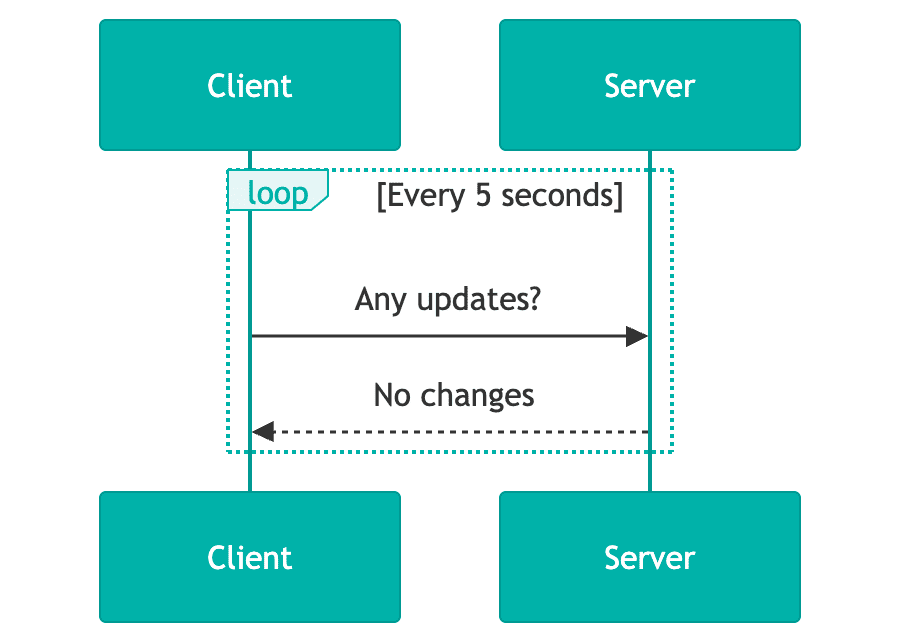
<p>To address the above use case, our API could trigger the email notification when we receive the call to update the email address. Other teams could poll our API to detect differences in the email for the users they care about. Here is a simple diagram to exemplify this:</p>

<figure style="margin: 2em 0; text-align: center;">
<img src="/images/2026-03-30-building-event-driven-systems-with-mongodb-change-streams/polling-sequence-diagram.png" alt="Sequence diagram showing a client polling a server every 5 seconds, repeatedly asking for updates and receiving 'no changes' responses" title="Polling sequence diagram: client repeatedly queries server for updates" width="400" />
<figcaption>A naive polling approach where clients repeatedly query the server for updates, wasting resources when data hasn't changed</figcaption>
</figure>

<p>The API being responsible for triggering the email notification creates tight coupling between our service and an external vendor, which can cause latency for customers, as well as introduce non-business specific logic into application code (like retries, deadlettering).</p>

<p>Polling the API is known to be problematic, especially at scale. It creates a high volume on a single API which wastes resources, introduces latency, creates logic duplication across consumers, and can lead to data drift. These problems are compounded when the data itself is relatively static.</p>

<h4 id="an-event-driven-approach">An Event Driven Approach</h4>

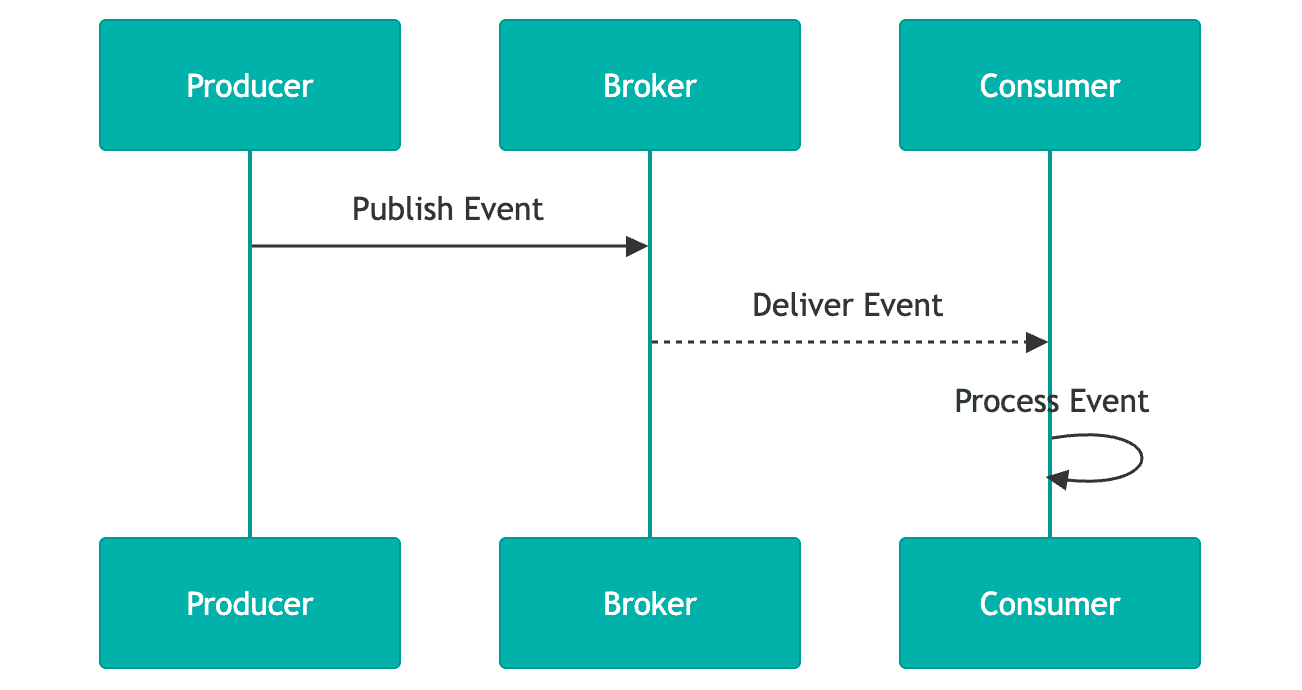
<p>Instead of polling, we can instead have systems “react” or “listen” to these changes in real time. A team who is interested in an email change for a user can subscribe to that change, and make any requisite updates they need to in order to properly handle the email change. More specifically, when a user’s email changes, we will send a “payload” to all subscribers of this event to notify them of the change.</p>

<figure style="margin: 2em 0; text-align: center;">
<img src="/images/2026-03-30-building-event-driven-systems-with-mongodb-change-streams/event-driven-sequence-diagram.png" alt="Sequence diagram showing a producer publishing an event to a broker, which delivers it to a consumer that then processes the event" title="Event-driven sequence diagram: producer to broker to consumer" width="550" />
<figcaption>An event-driven approach where the producer publishes once and the broker delivers to subscribed consumers in real time</figcaption>
</figure>

<p>Transforming the polling approach to this event driven solution solves the problems with polling, and builds a more robust and scalable solution. By offloading any dependency on the originating API itself to an asynchronous background task (which can be handled independently of the change itself), we reduce coupling, latency, and address resource waste, high volume, and potentially stale data.</p>

<p>In this event driven pattern, an event is sent upon the completion of some change occurring within a system. That event is received by a set of subscribers who can take individual actions depending on their use case (for example, sending the email confirmation).</p>

<p>To note, there are other versions of an event driven pattern not outlined here (for example webhooks). They have their own value and should be investigated as well.</p>

<h3 id="terminology">Terminology</h3>

<p>An <strong>event</strong> is a well defined payload sent upon a change within your systems. The well defined payload can be any agreed upon structure that your system needs and allows. The event payload (the change) should include the data required for other subsystems to react or process it. Taking the user email change from above, here’s a sample payload:</p>

<div class="language-json highlighter-rouge"><div class="highlight"><pre class="highlight"><code><span class="p">{</span><span class="w">
  </span><span class="nl">"source"</span><span class="p">:</span><span class="w"> </span><span class="s2">"users-api"</span><span class="p">,</span><span class="w">
  </span><span class="nl">"deduplicationId"</span><span class="p">:</span><span class="w"> </span><span class="s2">"c73b0718-9e76-4571-8112-390f2832dc03"</span><span class="p">,</span><span class="w">
  </span><span class="nl">"type"</span><span class="p">:</span><span class="w"> </span><span class="s2">"email-changed"</span><span class="p">,</span><span class="w">
  </span><span class="nl">"payload"</span><span class="p">:</span><span class="w"> </span><span class="p">{</span><span class="w">
    </span><span class="nl">"oldEmail"</span><span class="p">:</span><span class="w"> </span><span class="s2">"old.email@meltwater.com"</span><span class="p">,</span><span class="w">
    </span><span class="nl">"newEmail"</span><span class="p">:</span><span class="w"> </span><span class="s2">"new.email@meltwater.com"</span><span class="w">
  </span><span class="p">}</span><span class="w">
</span><span class="p">}</span><span class="w">
</span></code></pre></div></div>

<p>We include the source and the type, which allows other teams to ignore events they are not interested in. The deduplication ID is used for ensuring that we don’t send duplicate events. Lastly, we include the old and new email. This piece is a design choice. It’s not required to send difference-like events, you can also send snapshots.</p>

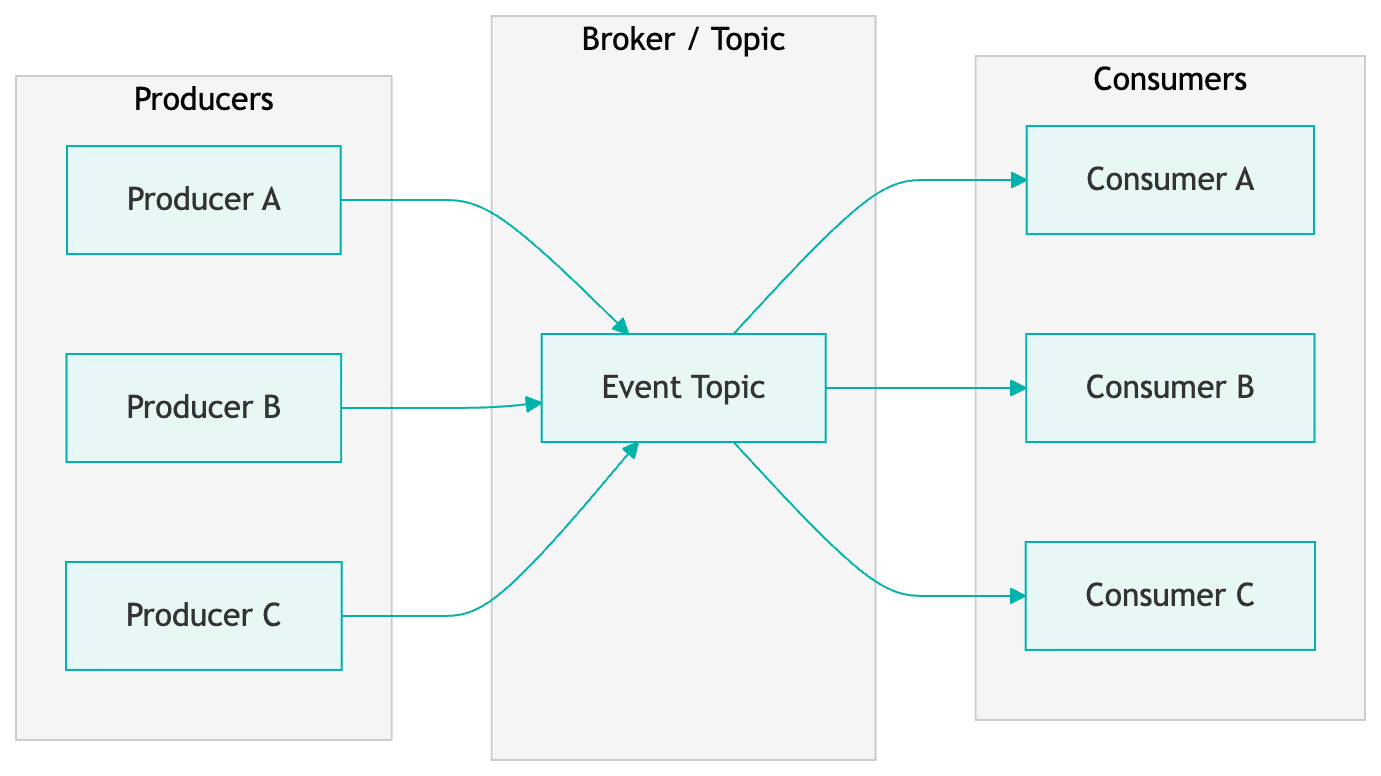
<p>More generally, <strong>producers</strong> send events to zero or more <strong>consumers</strong>. There are many ways to get events from producers to consumers. At Meltwater, we use the <strong>publish/subscribe</strong> <a href="https://en.wikipedia.org/wiki/Publish%E2%80%93subscribe_pattern" target="_blank">architecture</a> (or pub/sub for short). In this architecture, a consumer subscribes to a set of event types (i.e. email-changed) or all changes. The services and systems built using this architecture are considered to be <strong>event driven</strong>.</p>

<h3 id="sample-publishsubscribe-architecture">Sample Publish/Subscribe Architecture</h3>

<figure style="margin: 2em 0;">
<img src="/images/2026-03-30-building-event-driven-systems-with-mongodb-change-streams/pubsub-architecture.png" alt="Publish/subscribe architecture diagram with three producers sending messages to a central event topic broker, which fans out to three consumers" title="Publish/subscribe architecture: producers, broker, and consumers" />
<figcaption>A publish/subscribe architecture where multiple producers send events to a central broker that distributes them to subscribed consumers</figcaption>
</figure>

<p>Here is a very simple example of a publish/subscribe architecture. We have a set of producers who send messages or events to a broker. That broker then allows consumers to subscribe to specific (or all) events it accepts. The consumers will then receive payloads that match their subscription and can execute any code they like.</p>

<p>For our implementation here at Meltwater, we use AWS’s <a href="https://aws.amazon.com/sns/" target="_blank">Simple Notification</a> and <a href="https://aws.amazon.com/sqs/" target="_blank">Simple Queue</a> services (SNS/SQS respectively). Producers send an API call to our pub/sub service, which places a message on the SNS topic (the broker).</p>

<p>Consumers then register subscriptions for messages they care about and create SQS queues using those subscription filters. Any time a message in the topic or broker matches their subscription, it will be placed in their SQS queue for processing. Many of our consumers typically use serverless components (for example, AWS lambdas) as the volume isn’t always big enough to justify a continuously running service. The serverless instance will grab messages off the queue and process them. Below is an example of this flow.</p>

<figure style="margin: 2em 0;">
<img src="/images/2026-03-30-building-event-driven-systems-with-mongodb-change-streams/sns-sqs-lambda-flow.png" alt="Flow diagram showing the message path from producer to SNS topic to SQS queue to AWS Lambda with SQS trigger" title="AWS SNS/SQS/Lambda event processing flow" />
<figcaption>A typical AWS event processing pipeline: the producer publishes to an SNS topic, which routes messages to an SQS queue, triggering a Lambda function for processing</figcaption>
</figure>

<p>It is good practice to also configure <a href="https://aws.amazon.com/what-is/dead-letter-queue/" target="_blank">deadletter queues</a> (DLQ) with your SQS queues to handle error cases, however we won’t be diving into that here. I encourage you to read into those on your own.</p>

<h2 id="leveraging-mongodb-change-streams">Leveraging MongoDB Change Streams</h2>

<p>Now that we have an understanding of event based architectures, let’s see how we can use MongoDB to power this.</p>

<h3 id="operation-log">Operation Log</h3>

<p>In MongoDB, all transactions (insert, update, replace, delete) go into an <a href="https://www.mongodb.com/docs/manual/core/replica-set-oplog/" target="_blank">operation log</a>, oplog for short. An oplog is like a persisted event system, it’s a series of events that happened on the database you can access in real time.</p>

<h3 id="change-streams">Change Streams</h3>

<p>A <strong>change stream</strong> is the stream of events happening in the oplog. We can subscribe to those changes and react to them! MongoDB will publish any changes that happen in your database to this stream. Change streams are built on top of MongoDB aggregation, allowing us to write normal database queries as a way of interacting with the stream which is really powerful. You can learn more about change streams <a href="https://www.mongodb.com/docs/manual/changeStreams/" target="_blank">here</a>.</p>

<h4 id="limitations">Limitations</h4>

<p>There are some important limitations of change streams worthwhile mentioning. You can only have a single change stream per collection. If you want multiple streams, you will need to have two different collections. You can achieve this by merging documents (rows) into another collection inside your pipeline. There is a way to create multiple subscriptions on the single stream.</p>

<p>For the best stream performance, it is recommended to use at least MongoDB version 5.0 or above, and the newest compatible database driver version. You should also investigate the tuning options, specifically batch size and oplog size, as they can have an impact on your performance and ability to recover from any issues with your subscription or MongoDB.</p>

<p>We will discuss handling some of these limitations later.</p>

<h3 id="implementation">Implementation</h3>

<p>We now have the basic knowledge of events, event driven systems, and change streams. So how does this work in practice? Well, it’s really quite simple. You will need to spin up some application code which is long running (whether Kubernetes, Elastic Compute Cloud for example). That code will:</p>

<ul>
  <li>Make a connection to the database</li>
  <li>Get the specific collection you would like to listen to changes to, and then</li>
  <li>Create the change stream subscription</li>
</ul>

<p>We will outline sample code below.</p>

<h4 id="producer">Producer</h4>

<div class="language-javascript highlighter-rouge"><div class="highlight"><pre class="highlight"><code><span class="kd">class</span> <span class="nx">ChangeStreamConnection</span> <span class="p">{</span>
  <span class="k">async</span> <span class="nx">_connect</span><span class="p">()</span> <span class="p">{</span>
    <span class="nx">client</span> <span class="o">=</span> <span class="k">await</span> <span class="nx">MongoClient</span><span class="p">.</span><span class="nx">connect</span><span class="p">(</span><span class="nx">mongoUri</span><span class="p">,</span> <span class="nx">mongoOptions</span><span class="p">);</span>
    <span class="nx">database</span> <span class="o">=</span> <span class="k">await</span> <span class="nx">_connectToDatabase</span><span class="p">(</span><span class="nx">databaseName</span><span class="p">);</span>
    <span class="nx">collection</span> <span class="o">=</span> <span class="k">await</span> <span class="nx">_getCollection</span><span class="p">(</span><span class="nx">database</span><span class="p">,</span> <span class="nx">collectionName</span><span class="p">);</span>
    <span class="k">return</span> <span class="nx">_connectWatcher</span><span class="p">();</span>
  <span class="p">}</span>

  <span class="nx">_connectToDatabase</span><span class="p">(</span><span class="nx">databaseName</span><span class="p">)</span> <span class="p">{</span>
    <span class="k">return</span> <span class="nx">client</span><span class="p">.</span><span class="nx">db</span><span class="p">(</span><span class="nx">databaseName</span><span class="p">);</span>
  <span class="p">}</span>

  <span class="k">async</span> <span class="nx">_getCollection</span><span class="p">(</span><span class="nx">database</span><span class="p">,</span> <span class="nx">collectionName</span><span class="p">)</span> <span class="p">{</span>
    <span class="k">return</span> <span class="k">await</span> <span class="nx">database</span><span class="p">.</span><span class="nx">collection</span><span class="p">(</span><span class="nx">collectionName</span><span class="p">,</span> <span class="p">{</span> <span class="na">strict</span><span class="p">:</span> <span class="kc">true</span> <span class="p">});</span>
  <span class="p">}</span>
<span class="p">}</span>
</code></pre></div></div>

<p>We create the Mongo client, connect to the database, grab the collection, and then connect the watcher. The watcher is what we call our application which watches the change stream. It’s simply where we create our subscription.</p>

<h4 id="subscription">Subscription</h4>

<div class="language-javascript highlighter-rouge"><div class="highlight"><pre class="highlight"><code><span class="k">async</span> <span class="nx">_connectWatcher</span><span class="p">()</span> <span class="p">{</span>
  <span class="kd">const</span> <span class="nx">operationTypes</span> <span class="o">=</span> <span class="p">{</span>
    <span class="na">$match</span><span class="p">:</span> <span class="p">{</span>
      <span class="na">operationType</span><span class="p">:</span> <span class="p">{</span> <span class="na">$in</span><span class="p">:</span> <span class="p">[</span><span class="dl">'</span><span class="s1">insert</span><span class="dl">'</span><span class="p">,</span> <span class="dl">'</span><span class="s1">update</span><span class="dl">'</span><span class="p">,</span> <span class="dl">'</span><span class="s1">replace</span><span class="dl">'</span><span class="p">,</span> <span class="dl">'</span><span class="s1">delete</span><span class="dl">'</span><span class="p">]</span> <span class="p">}</span>
    <span class="p">}</span>
  <span class="p">};</span>

  <span class="nx">_changeStreamCursor</span> <span class="o">=</span> <span class="nx">collection</span><span class="p">.</span><span class="nx">watch</span><span class="p">(</span>
    <span class="p">[</span><span class="nx">operationTypes</span><span class="p">],</span>
    <span class="p">{</span> <span class="na">fullDocument</span><span class="p">:</span> <span class="dl">'</span><span class="s1">updateLookup</span><span class="dl">'</span><span class="p">,</span> <span class="nx">batchSize</span> <span class="p">}</span>
  <span class="p">);</span>
<span class="p">}</span>
</code></pre></div></div>

<p>Here we create our actual subscription to the change stream. We call a <a href="https://www.mongodb.com/docs/manual/reference/method/db.collection.watch/#mongodb-method-db.collection.watch" target="_blank">watch</a> method on the collection itself (we got this in the previous code snippet), which takes an array of aggregation pipeline stages, and then a set of options.</p>

<p>The aggregation pipeline contains the definition of operationTypes, which specifies the types of operations we want from our oplog in the stream. For simplicity’s sake, we are only keeping one stage in the pipeline. But, we could add any other stages to that array, for say ignoring specific updates, or doing further processing like projection before handling the event in application code.</p>

<p>For brevity’s sake, the options here are small (please consult the MongoDB docs to learn more). Here we use:</p>

<ul>
  <li><strong>batchSize</strong> - This specifies how many events we want from the change stream inside a single batch.</li>
  <li><strong>fullDocument</strong> - Set to <code class="language-plaintext highlighter-rouge">updateLookup</code>. This means that we will get the full document for update events instead of just the changed fields. This allows us to publish the new version of the user in entirety.</li>
</ul>

<h4 id="listener">Listener</h4>

<p>The last piece of code you need is handling the change event which is triggered by this subscription. That code is pretty simple:</p>

<div class="language-javascript highlighter-rouge"><div class="highlight"><pre class="highlight"><code><span class="k">this</span><span class="p">.</span><span class="nx">_changeStreamCursor</span><span class="p">.</span><span class="nx">on</span><span class="p">(</span><span class="dl">'</span><span class="s1">change</span><span class="dl">'</span><span class="p">,</span> <span class="p">(</span><span class="nx">event</span><span class="p">)</span> <span class="o">=&gt;</span> <span class="p">{</span>
  <span class="k">this</span><span class="p">.</span><span class="nx">_relayEvent</span><span class="p">(</span><span class="nx">event</span><span class="p">);</span>
<span class="p">});</span>
</code></pre></div></div>

<p>In our case we call <code class="language-plaintext highlighter-rouge">_relayEvent</code>, but it can be any function you define. Depending on your use case, it could just be doing the publish right from here. We perform cleaning and transformation before sending anything downstream, which happens within this call stack.</p>

<h4 id="putting-it-all-together">Putting it All Together</h4>

<p>By combining the Producer, Subscription, and Listener sections together, you will have all the code for processing realtime change stream events that can then be sent to a message broker.</p>

<p>Most of this code is generic, but I would like to highlight how this maps to our example. Going back to our use case above, the Subscription allows us to process all user update events in the change stream. When those events are placed in the stream, the Listener is triggered, allowing us to build the well defined payload we made earlier and send it to the SNS topic.</p>

<h3 id="performance">Performance</h3>

<h4 id="scalability">Scalability</h4>

<p>Without much tuning we were averaging about ~25 user events/sec with no alerts. Our bottlenecks stem from JSON parsing and the cleaning we do before publishing a message to the SNS topic.</p>

<p>This can be offloaded to aggregation pipeline steps in the future, running natively in MongoDB and benefiting from their optimizations, all before we reach our application. From here tuning the <code class="language-plaintext highlighter-rouge">watch</code> function options (like increasing the batch size) can improve performance.</p>

<h4 id="considerations">Considerations</h4>

<h5 id="horizontal-scaling">Horizontal Scaling</h5>

<p>There can only be one change stream per collection. If you want to horizontally scale, you’ll want to do one of two things:</p>

<ul>
  <li><strong>Make your subscriptions specific</strong> (i.e. only updates) - Create multiple subscriptions on the same stream (and multiple instances of your application)</li>
  <li><strong>Merge changes into other collections</strong> to create multiple change streams - Be aware you will need to manage this yourself, so keep in mind the complexity</li>
</ul>

<h5 id="application-logic">Application Logic</h5>

<p>I recommend minimizing any logic outside of the stream itself. Use aggregation steps as much as possible, keeping your application logic small, and leverage the more performant aggregation pipeline.</p>

<p>If you need to do processing in the application layer, architect your solution to do that outside of the stream handling itself. Place events from the stream into a queue for a separate process to do longer running operations. This keeps your stream as close to real time as possible, without sacrificing your underlying logic. You can even leverage the sample architecture above.</p>

<h5 id="pausing">Pausing</h5>

<p>It is possible to <em>pause</em> a stream. Since this is a log of changes, if you pause at 5 out of 10 events, further events will continue to build up in the stream, but you can resume at 6 using timestamps.</p>

<p>This is powerful for keeping your application running with the stream, minimizing interruption, and allowing you to heal the process by catching up to the backlog of events (see the <code class="language-plaintext highlighter-rouge">resumeAfter</code> and <code class="language-plaintext highlighter-rouge">startAfter</code> <code class="language-plaintext highlighter-rouge">watch</code> function options).</p>

<h2 id="future-considerations">Future Considerations</h2>

<p>Our implementation of this architecture allowed us to fully replicate a MongoDB database running outside of Atlas with eventual consistency, as well as power all core user events with no downtime. This implementation can be improved in the future, by leveraging newer MongoDB features and products.</p>

<h3 id="stream-processors">Stream Processors</h3>

<p>Stream processors are a newer MongoDB product and are built on top of change streams. You can reuse your existing aggregation pipeline(s) defined above, but this runs directly on MongoDB instead of your application. This product enables you to create very complex multi step processors that can also publish to a growing list of event brokers directly.</p>

<p>Theoretically, you can replace this entire architecture (minus the publish/subscribe system), with something running natively on MongoDB Atlas. You will get the best of both worlds: native MongoDB code, running on the most optimized hardware.</p>

<h2 id="wrap-up">Wrap Up</h2>

<p>Thank you for taking the time to read this through! I hope you learned something valuable and want to try out MongoDB change streams. They are a very powerful tool that can help you build a reliable and performant system.</p>

<p>I would also like to thank MongoDB for allowing us to participate in their private preview program for stream processors, and allowing us to submit feedback.</p>

<h2 id="useful-links">Useful Links</h2>

<h3 id="change-streams-1">Change Streams</h3>

<ul>
  <li><a href="https://www.mongodb.com/docs/manual/changeStreams/" target="_blank">Change Streams</a></li>
  <li><a href="https://www.mongodb.com/docs/manual/core/aggregation-pipeline/" target="_blank">Aggregation Pipelines</a></li>
</ul>

<h3 id="stream-processors-1">Stream Processors</h3>

<ul>
  <li><a href="https://www.mongodb.com/blog/post/atlas-stream-processing-now-in-public-preview" target="_blank">Blog Post - Atlas Stream Processing public preview announcement</a></li>
  <li><a href="https://podcasts.mongodb.com/public/115/The-MongoDB-Podcast-b02cf624" target="_blank">Podcast - Inside MongoDB’s Atlas Stream Processing with Kenny Gorman (Head of Streaming Products @ MongoDB)</a></li>
  <li><a href="https://www.mongodb.com/docs/atlas/atlas-sp/overview/" target="_blank">Documentation - Atlas Stream Processing</a></li>
  <li><a href="https://learn.mongodb.com/courses/atlas-stream-processing" target="_blank">Training - Learning Byte (20min) on Atlas Stream Processing</a></li>
</ul>]]></content><author><name>Cody Perry</name></author><category term="architecture" /><category term="mongodb" /><category term="event-driven-architecture" /><category term="aws" /><summary type="html"><![CDATA[As an engineer on one of Meltwater’s enablement teams, I work on managing our users database and making that data available to other engineering teams.]]></summary></entry></feed>